
WhatsConvo
Who said what, and when?
WhatsConvo is a powerful iOS app that transforms your WhatsApp chat backup files into an organized, searchable archive. Import your chat history, rediscover precious memories, and take control of your media storage.
Coming Soon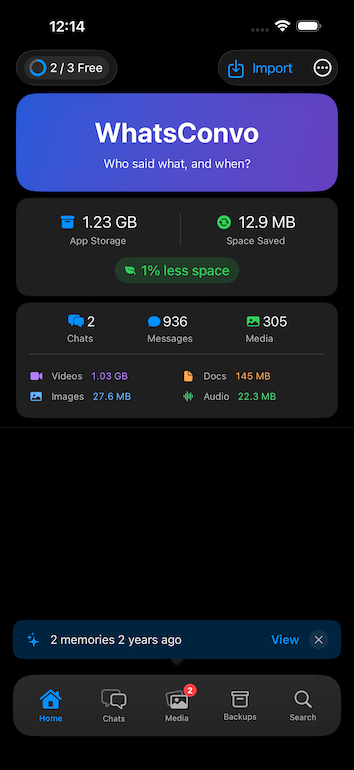
Features
Import
One-Tap Import
Import WhatsApp export ZIP files straight from the Files app or the share sheet. WhatsConvo automatically detects the export format — including newer iOS export variants — and extracts all your chats, messages, and media files.
Smart Preview
Before importing, see exactly what's in your backup: chat name, message counts, media files, participants, and date ranges. Make informed decisions about what to import.
Incremental Import
Already imported a chat? No problem. WhatsConvo intelligently detects duplicates and only adds new messages, keeping your archive up-to-date without redundancy.
Import History
Track all your imports with detailed activity logs showing success rates, message counts, duplicates skipped, and storage saved.
Safe by Design
Imports are validated against malformed or malicious archives with size limits, format checks, and content verification. Private staged copies are removed when the import flow ends, with an additional cleanup sweep at app launch for interrupted flows.
Browsing
Full Chat History
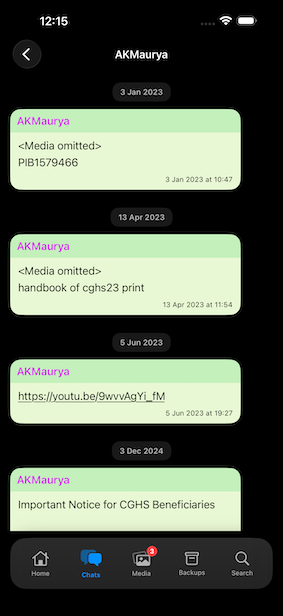
Browse your complete conversation history with the familiar chat interface. Messages are displayed chronologically with sender names, timestamps, and media references.
Smart Grouping
Consecutive messages from the same sender are grouped together, making long conversations easy to follow.
Date Navigation
Clear date separators help you jump to specific time periods in your chat history.
Color-Coded Chats
Each chat is automatically assigned a unique color for easy identification across the app.
Search
Global Search
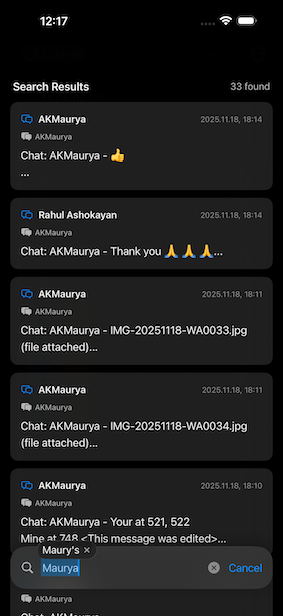
Find any message across all your chats instantly. Search by message content, sender name, chat name, date by month and year, or media file name.
Smart Results
Search results show matching snippets with highlighted keywords, sender info, and timestamps. Tap any result to jump directly to that message in context.
Media
Unified Media Browser
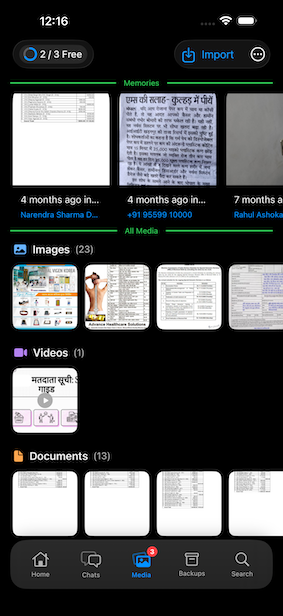
View all your photos, videos, audio files, and documents in one beautiful gallery. Filter by media type to find exactly what you're looking for.
Full-Screen Preview
View media in full-screen with pinch-to-zoom for images, video playback with optional autoplay, an audio player, and viewers for PDF and Office documents.
Media Context
See where each media file came from: the original message, chat name, sender, and timestamp.
Content Verification
Every file's real type is verified against its contents; files that misrepresent themselves are flagged and blocked from preview.
Memory Lane
On This Day
Rediscover memories from years past. WhatsConvo surfaces photos and media from the same day in previous years.
Daily Memories
Get surprised with up to 3 memory cards each day, showing meaningful moments from your chat history.
Easy Navigation
Tap any memory to jump to the original message and relive the full conversation context.
Analytics
Visual Dashboard
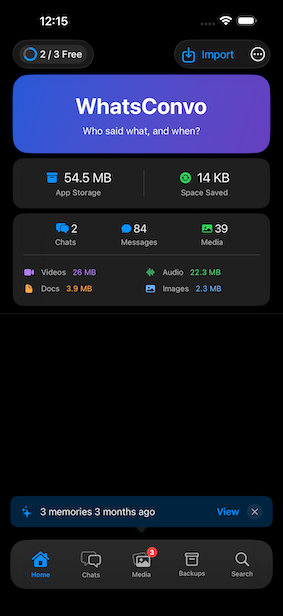
See your storage usage at a glance with interactive charts showing breakdown by media type (images, videos, audio, documents).
Per-Chat Breakdown
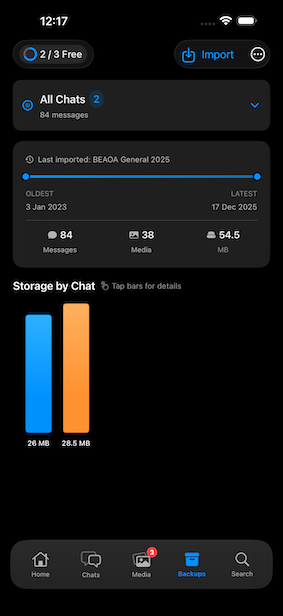
Understand which chats use the most storage with detailed per-chat analytics and bar chart visualizations.
Deduplication Savings
Track how much storage space you've saved through WhatsConvo's intelligent deduplication system.

Deduplication
Exact Match Detection
WhatsConvo uses SHA256 hashing to identify identical files across multiple chats, storing each unique file only once.
Visual Similarity
For images, perceptual hashing detects visually similar photos (even with slight differences), preventing near-duplicate storage.
Space Savings
See exactly how much storage you've saved through deduplication, with real-time statistics on the dashboard.

Storage
Soft Delete System
Deleted media files are retained for 7 days before permanent removal, giving you a safety net to recover accidentally deleted files.
Scheduled Cleanup
Background cleanup automatically removes expired files and sweeps up orphaned files, keeping your storage optimized without manual intervention.
Manual Control
View pending deletions in Settings and trigger manual cleanup whenever you need to free up space immediately.

Statistics
Overview Dashboard
Total messages across all chats, number of unique chats, participant count, message date range, and recent activity (7-day and 30-day counts).
Chat Insights
Most active chat identification, average messages per chat, and per-chat message and media counts.
Media Analytics
File counts by type, storage usage by type, and duplicate detection statistics.

Privacy
100% On-Device
WhatsConvo has no server, no analytics, and no tracking — it never transmits your imported chat data. All chat processing happens locally. Your device's standard iCloud or computer backups may include WhatsConvo's data like any other app, and you can exclude it in iOS Settings.
Protected at Rest
Your media is stored in the app's private sandbox with iOS data protection — encrypted while your device is locked — and is never exposed to the Files app.
Complete Deletion
Delete individual chats, media files, or your entire imported archive at any time. Clearing your archive removes imported messages, media, reports, and temporary import and export files; purchase status and app preferences are retained.
Portable Export
Create a local ZIP from Settings containing a structured JSON copy of your WhatsConvo data and all available imported media. The app does not transmit the export; you choose where to save or share it through iOS.
No Account Required
Use WhatsConvo without creating an account or signing in to any service.

Design
Native Experience
Built with SwiftUI for a smooth, responsive experience that feels right at home on iPhone and iPad.
Adaptive Layout
Optimized layouts for iPhone and iPad. The interface adapts to your screen size for the best viewing experience.
Theme Support
Choose between Light, Dark, or System theme to match your preference.

Free vs Unlimited Chats
| Feature | Free | Unlimited Chats |
|---|---|---|
| Chat Imports | Up to 3 user chats; samples excluded | Unlimited |
| Message Search | Yes | Yes |
| Media Gallery | Yes | Yes |
| Memory Lane | Yes | Yes |
| Storage Analytics | Yes | Yes |
| Deduplication | Yes | Yes |
| Import History | Yes | Yes |
| Local Data Export | Yes | Yes |
Unlimited Chats is a permanent one-time purchase. It is separate from any future WhatsConvo Pro offering.
Getting Started
Import into WhatsConvo
Open WhatsConvo and tap Import. Select your ZIP file and let the app process it.
Browse Your Messages
Explore your full chat history with messages, media, and search.
Rediscover Memories
Check Memory Lane for photos and moments from years past.
WhatsConvo is coming soon
We're putting the finishing touches on WhatsConvo. Check back soon.